
SMS opt-in
CampaignAI (Campaign AI Inc.) texts its own account holders about their CampaignAI account — only those who give their express consent by opting in to “Text me about my account”. This page shows that consent checkbox, its exact wording, what we send and how to withdraw consent, so mobile carriers, reviewers and the public can check it. CampaignAI is for businesses, organisations, and individuals acting in a business or professional capacity (for example, self-employed people); its account holders are the people who sign up to use it.
1. Who sends these texts
Every text comes from CampaignAI (Campaign AI Inc.), from our own toll-free number, 1-833-270-2566, and starts with “CampaignAI:”. We text only our own account holders, only about their own account, and only after they opted in with the consent checkbox below. This number is never used to send messages on behalf of CampaignAI's customers.
2. Where you opt in
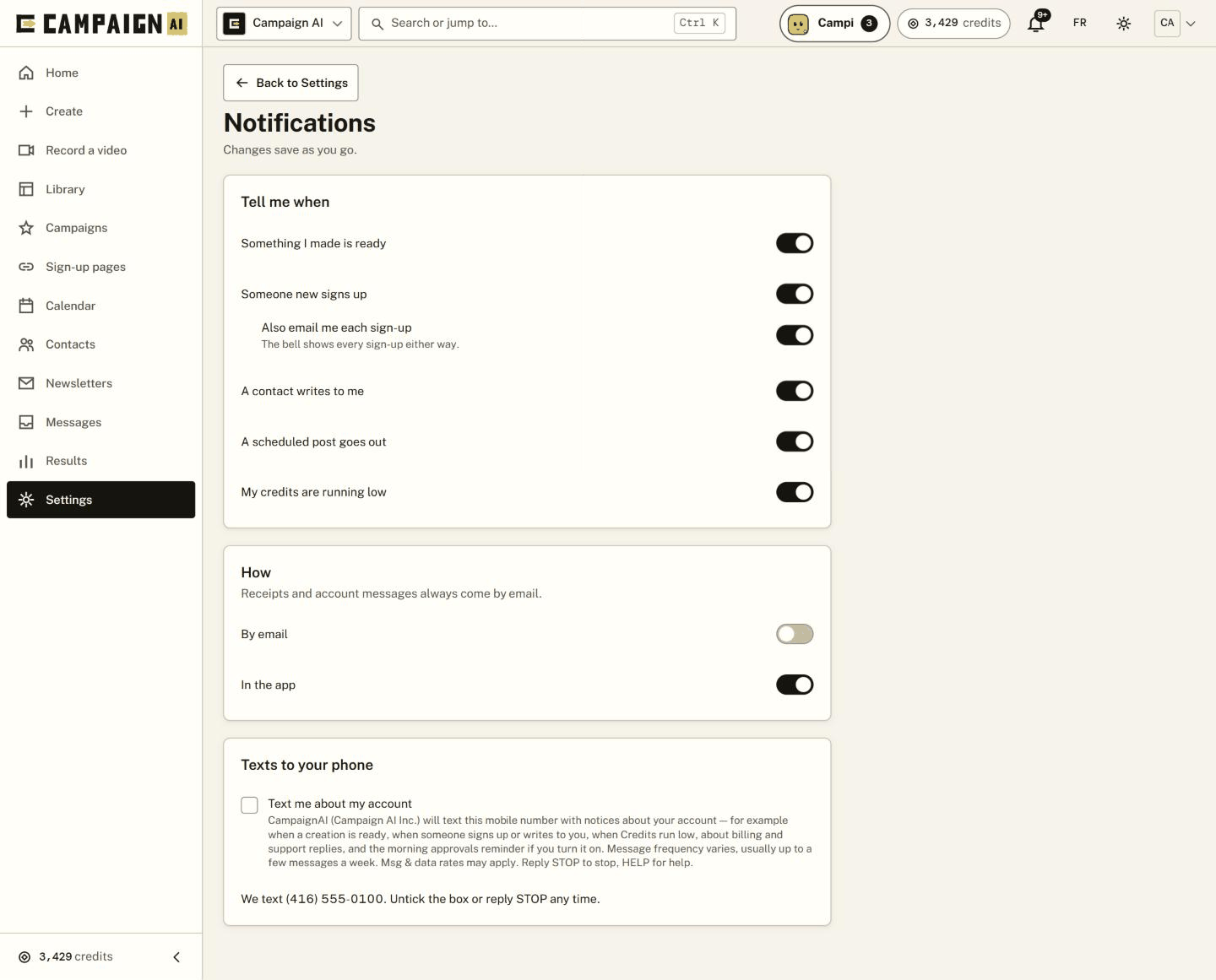
The consent checkbox appears in two places in the CampaignAI app: when you create your account (the first set-up step, right under the phone number field), and in Settings → Notifications, under “Texts to your phone”. It is never pre-checked (not pre-selected): you have to check it yourself. It is optional and never a condition of using CampaignAI or of buying anything. It covers the mobile number you entered; if you change that number, texts stop until you opt in again.
3. The exact wording
In Settings → Notifications, under “Texts to your phone”:
And when you create your account:
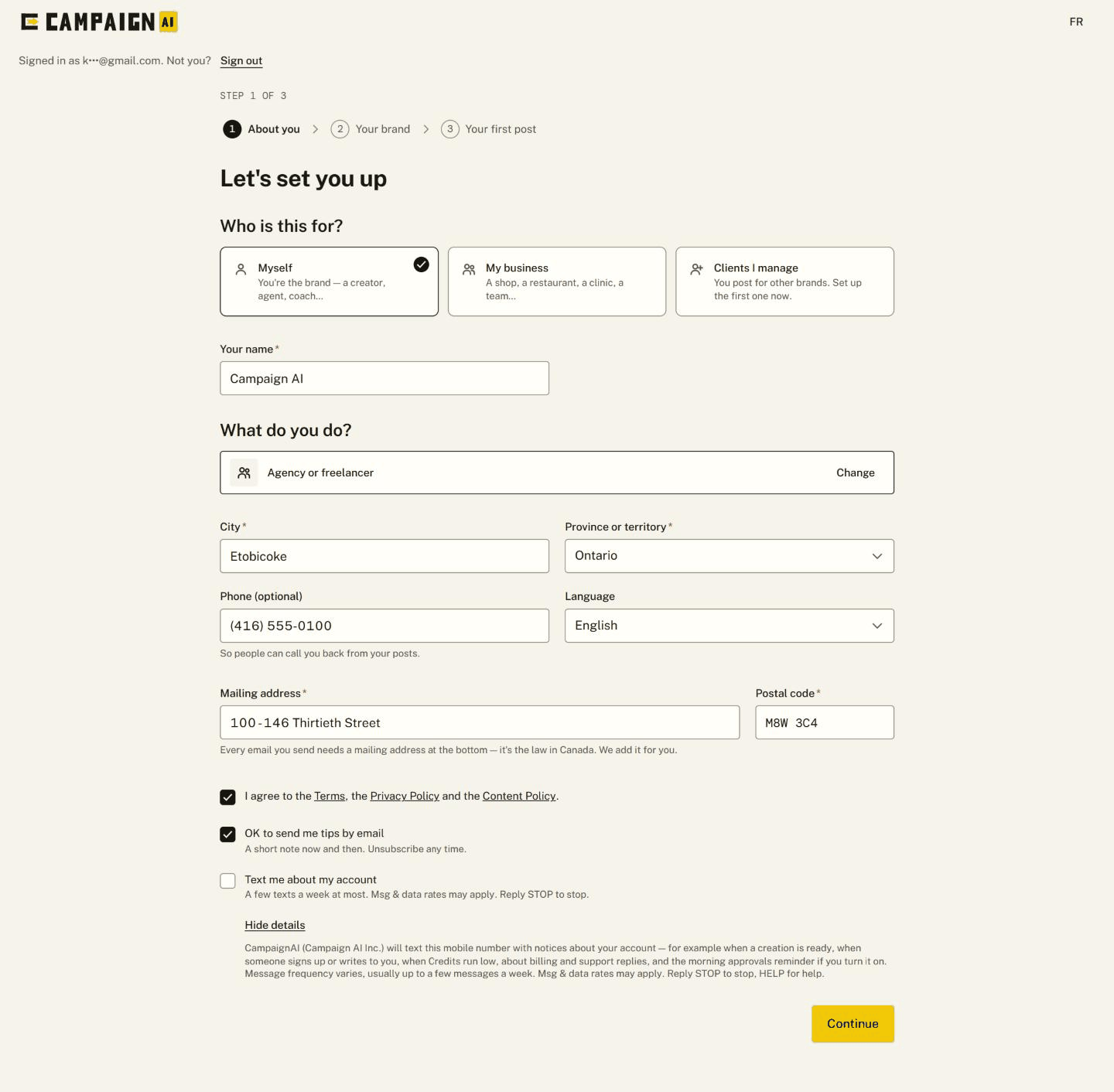
The consent checkbox reads, word for word:
Text me about my account
CampaignAI (Campaign AI Inc.) will text this mobile number with notices about your account — for example when a creation is ready, when someone signs up or writes to you, when Credits run low, about billing and support replies, and the morning approvals reminder if you turn it on. Message frequency varies, usually up to a few messages a week. Msg & data rates may apply. Reply STOP to stop, HELP for help.
In the French app the same box reads:
Textez-moi au sujet de mon compte
CampaignAI (Campaign AI Inc.) textera ce numéro de cellulaire pour des avis sur votre compte — par exemple quand une création est prête, quand quelqu’un s’inscrit ou vous écrit, quand vos crédits baissent, au sujet de la facturation et des réponses du soutien, et pour le rappel matinal des approbations si vous l’activez. La fréquence des messages varie, habituellement quelques messages par semaine au plus. Des frais de messagerie et de données peuvent s’appliquer. Répondez ARRÊT pour arrêter, AIDE pour obtenir de l’aide.
4. What we send and how often
Only notices about your CampaignAI account, for example:
- a post, video or design you made is ready;
- someone signed up on your sign-up page or wrote to you;
- your Credits are running low, and billing notices;
- replies from our support team;
- the morning approvals reminder, if you turn it on.
We never send ads or offers by text. Message frequency varies, usually up to a few messages a week. Msg & data rates may apply. Examples:
CampaignAI: Your slideshow is ready: “Fall menu” is ready to post. Reply STOP to opt out.
CampaignAI: New sign-up: Jordan, from your Fall menu page: They’re in your contacts now. Reply while it’s fresh. Reply STOP to opt out.
CampaignAI: you get account notices from us by text. Help: support@campaignai.ca. Reply STOP to opt out.
5. What is recorded
When you opt in, we record your express consent, the date and time, the version and language of the wording you saw, and where you gave it (at sign-up or in Settings). If the checkbox is left unchecked, nothing is recorded and we do not text you. See our Privacy Policy.
6. Withdrawing consent, and help
You can withdraw your consent at any time: reply STOP (or ARRÊT) to any of our texts, or uncheck the consent checkbox in Settings → Notifications, and we stop at once; you get one text confirming it. Reply START to turn them back on — only if you had opted in before. Reply HELP (or AIDE) for help, or email support@campaignai.ca. The full rules are in our SMS Terms.
7. Contact
- Company
- Campaign AI Inc., Unit 100, 146 Thirtieth Street, Etobicoke, Ontario M8W 3C4, Canada · 1-888-288-5766 · support@campaignai.ca
- Help with texts and privacy
- support@campaignai.ca